“I wouldn’t even know what to install.”
We Start With Setup
Install the tools with us live. Get to know your code editor, project folder, terminal, and browser before we ask you to build anything.
Claude Code & Codex Shipping Lab
Never opened a code editor? Start here. We’ll install the tools together, explain how AI works, and write your first code—with and without AI. Then use Claude Code and Codex to adapt a supplied project, check it on different screen sizes, and publish a demo with free hosting.
No prior coding experience required. For curious beginners, career changers, and anyone who wants to stop watching and start building.
Thursday, October 15, 2026 · 11 a.m.–3 p.m. Eastern · $149 USD / £119 GBP
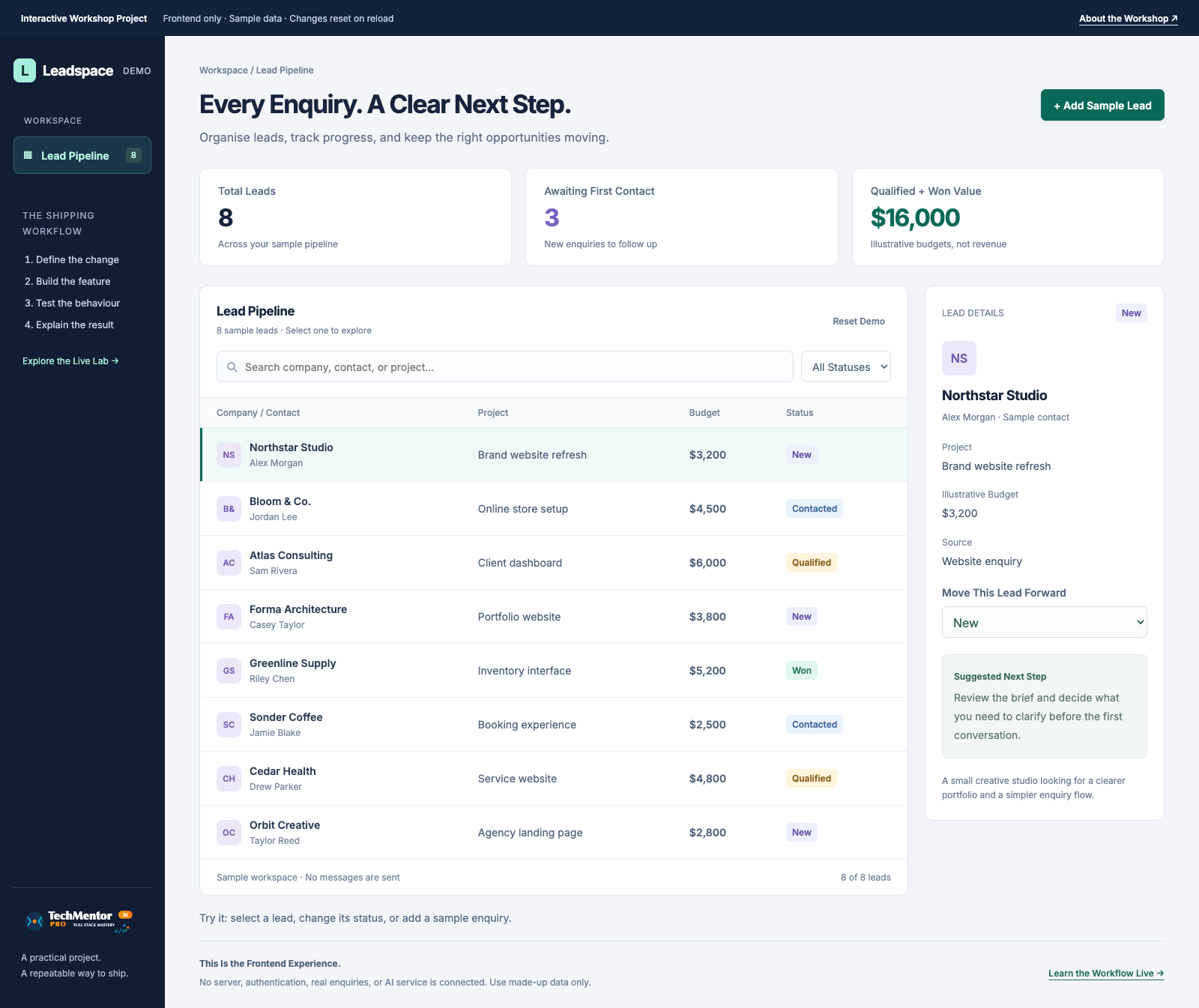 Open the Interactive Demo
This is the supplied project we’ll learn with—not something you’re expected to build from a blank screen. Try it now, with no account or setup. Sample data only.
You Don’t Have to Figure It Out Alone
You don’t need a technical background, a business idea, or the right vocabulary. Bring your questions. We’ll explain what to open, what to type, and why each step matters.
“I wouldn’t even know what to install.”
Install the tools with us live. Get to know your code editor, project folder, terminal, and browser before we ask you to build anything.
“What if everyone else is faster?”
Ask questions at each stage. Supplied working copies help you rejoin the group, and the 30-day replay lets you pause and repeat the steps afterwards.
“Will I understand it—or just copy AI?”
Write a tiny change yourself first, then use AI to extend it. We explain the result and check it together instead of treating generated code as automatically correct.
Watch a step. Try it. Check it. Ask. That’s the rhythm of the workshop—not four hours of watching someone else type.
Follow the Beginner RoadmapTry the Outcome Before You Choose the Workshop
Your first exercise is a simple line of code. Then we move into this prepared dashboard—a website for viewing sample enquiries—and make a useful change together. You won’t need to invent an app or build this entire interface from scratch.
Take a 60-Second Test Drive
Frontend only. No account needed. Sample changes reset on reload. Workshop testing and deployment are not simulated here.
Write your first code, ask Claude Code or Codex for help, and see a change appear in your browser. Learn to give clear instructions and review what the assistant changes.
Preview mobile, tablet, and desktop widths. Check readable text, buttons, forms, and layouts, then work through a fix when something doesn’t behave as expected.
Publish the learning demo using free hosting, open its public address, and check that someone else can visit it. No paid domain is needed for this exercise.
The dashboard uses seeded, synthetic enquiries and local data. Authentication, a shared database, real lead capture, billing, and customer-data handling are outside this four-hour lab.
A Useful First Step, Not an Overnight Transformation
The goal is to make building less mysterious: understand a small change, use AI to help, check the result, and share it. You’ll have the starter and guides to repeat the process after class.
See How the Live Session Gets You There ↓From Installation to a Public Website
Four hours including setup, questions, and two short breaks. We demonstrate both Claude Code and Codex; follow along in one so you’re not learning two interfaces at once.
00:00–00:40 · Set Up Together
Walk through tool installation and coding environment setup live. Learn what the code editor, project folder, terminal, and browser each do. Open the supplied starter and get it running on your laptop.
Your checkpoint: recognise the tools and see the starter in your browser.00:40–00:55 · Understand AI
Learn, in plain language, how an AI coding assistant uses your instructions and project context to suggest code. See Claude Code and Codex in action, what makes a useful prompt, and why a confident answer can still need correcting.
Your checkpoint: know what to ask AI and what you need to check yourself.00:55–01:15 · Your First Code
Type a small line of HTML together and see it appear in the browser. Then ask an assistant to extend it. We explain the difference between the page’s content, its styling, and the code that makes it interactive.
<h1>Hello, world!</h1>“Explain this heading, then help me style it so it stays readable on a phone.”
01:25–02:15 · Build With AI
Move from the tiny exercise to the dashboard. Adapt its heading, explanatory text, or layout with clear instructions and small steps. We demonstrate both assistants, review what changed, and show how to ask for an explanation or recover from a mistake. The existing filters and lead controls give us working behaviour to check—not features you must recreate from scratch.
Your checkpoint: try your change and explain what it does in your own words.02:15–02:45 · Check Different Screens
Use the browser’s screen-size previews to check text, layouts, and controls, then fix one responsive layout issue together in your chosen assistant. Watch a short Codex demonstration explaining a supplied automated check for normal and missing inputs; you won’t need to write a test suite from scratch.
02:55–04:00 · Publish and Share
Spend 50 minutes walking through publishing the learning demo on GitHub Pages’ free hosting, finding its public web address, and checking the live page. No paid hosting plan or custom domain is needed for this exercise. Use the final 15 minutes for a recap, questions, and your review checklist.
Your checkpoint: work toward a public demo link you can share. If an account or publishing issue blocks you, keep a working local copy and finish with the guide and replay.Guidance While You’re Learning
Free tutorials can show you a finished result. Here, you get a time to practise, a person to ask, and a shared route through the confusing parts—from the first installation to the publishing screen.
We teach and demonstrate both Claude Code and Codex. You only need access to at least one for hands-on practice. AI subscriptions and usage costs are separate from the ticket.
Who Will Guide You
Your instructor brings 10 years of experience and works at a major US consulting firm. In this workshop, the focus is on making the engineering process understandable: a small change, a clear explanation, and a check you can repeat.
An independent TechMentor Pro workshop—not an employer-sponsored course or an official Anthropic or OpenAI certification.
There’s no expectation to know the commands already. We explain them as we use them.
No programming homework is required. We cover installation and the coding environment live. If you prefer a head start, the optional 30–45 minute setup guide is there for you—not a test you must pass to attend.
Not sure which tool to choose? These are coding assistants, not just the ordinary chat window. Ask us to check your computer and existing access before you buy a new subscription.
Unsure About Your Setup? Ask Us FirstMake Time for Your First Build
Join us on October 15 for a guided route from “Where do I begin?” to understanding how to build, check, and share a small website. Bring curiosity. We’ll bring the project and the steps.
Live online · Four hours including two short breaks · Maximum 20 learners
Access the workshop information and preparation guide in Teachable. Check your laptop and accounts, bring your questions, and join the live session. No coding knowledge or original project idea needed.
October 15 Workshop Ticket
$149 USDor £119 GBP
One payment for one four-hour live workshop.
Tool access for Claude Code or Codex is not included. Any applicable taxes are shown at checkout.
Choose your currency · Secure checkout by Teachable
Same workshop and inclusions with either option.
Questions before you enroll? Book an admissions call or email info@techmentorpro.net. Review the purchase and refund terms displayed at checkout before paying.
The Questions You Might Be Hesitating to Ask
You don’t need to know the technical terms to ask a good question. If your concern isn’t covered here, admissions can help you decide before you pay.
Ask Us Your QuestionYes. We start with the tools, not a technical test. No JavaScript, Git, or terminal experience is required. You’ll write a tiny line of code with the group before we use AI or move into the supplied dashboard. This is a supported first experience of building—not a promise to become a professional developer in four hours.
Yes. Tool installation and coding environment setup are part of the live agenda. Before class, check that you can install software, sign in to your chosen AI tool, and access your GitHub account. The advance setup guide is optional. A managed work laptop may restrict installations; ask admissions about your setup beforehand if you’re unsure.
We explain the assistant’s role in plain language: how your instructions and project context guide its output, what makes a clear request, and why its suggestions can be wrong. You’ll write code yourself, ask AI to extend or explain it, and compare the result. We are learning to use coding assistants, not training an AI model or adding one inside the app.
Ask during the session. We use shared checkpoints and supplied working copies so one broken change doesn’t have to stop you following the next step. The 30-day replay lets you revisit anything you missed. We’ll troubleshoot common issues together, but cannot promise to resolve every individual computer or account problem during a group session.
We work in the supplied learning project with sample data—not your employer’s code or a real customer system. Learn to review a proposed change before accepting it, read commands before running them, and return to a saved working copy when needed. Never paste passwords, secret keys, or private customer information into prompts or a public repository. AI can make mistakes; learning how to check its work is part of the workshop.
We walk through publishing the static learning demo to GitHub Pages and opening its public address. GitHub Pages is available for public repositories on GitHub Free, within its usage limits. No paid domain is needed. Your demo and its source will be public: use sample data, never passwords, keys, or customer information. AI tool costs are separate, and this free route is for the learning demo—not a hosted business service.
We work toward a public link together, but account verification, internet problems, or a hosting service issue can delay it. Keep the working project on your laptop, follow the publishing guide, and replay the walkthrough to finish afterwards. We teach the full process; we don’t guarantee every learner will have a live site before the session ends.
We introduce responsive design: layouts that adapt to the available screen width. Use the browser’s device previews to check text, spacing, buttons, and forms at phone, tablet, and desktop sizes, then fix an example together. You can also open the public link on your own phone. These checks build a useful habit; no short workshop can guarantee a bug-free experience on every device and browser.
No second AI subscription or paid domain is required for the workshop. We demonstrate both tools; arrange working access to at least one for hands-on practice. Any AI subscription, credits, or usage allowance is separate from the ticket. A free GitHub account and the free demo-hosting route are sufficient for publishing this exercise. Ask admissions if you need help understanding the requirements before buying.
You’ll need a laptop or desktop with internet access and permission to install the tools to code along. A phone is useful for checking your finished page, but it doesn’t replace the workshop coding setup.
No. We start with a tiny coding exercise, then use a prepared dashboard so there is time to learn the whole workflow. You’ll adapt it, check a change, and practise publishing it. It uses synthetic leads and local data. User accounts, shared databases, payments, and handling real customer information are outside this workshop.
You’re paying for guided practice, a live opportunity to ask questions, a prepared project, and one exercise review—not access to secret information. If you learn comfortably on your own, free resources may suit you. If you want a structured first build with explanations and checkpoints, that is what this workshop is designed to provide.
Submit the supplied dashboard exercise within seven days after the workshop. One bounded review checks the exercise against its completion criteria, with feedback within the next seven days. Unrelated client projects and unlimited support are not included.
No. TechMentor has three learning formats: Live Cohort, full-library Self-Paced access, and goal-oriented Live Workshops. This ticket covers one standalone workshop, its replay, resources, and exercise review. There is no automatic cohort credit or full-library access.
Choose the $149 USD or £119 GBP option above and complete secure checkout with Teachable. Both options enroll you in the same live workshop on Thursday, October 15, 2026. Workshop access and preparation information are hosted in your Teachable course. Review the purchase and refund terms at checkout, and contact admissions if you have questions before paying.
Your First Step Can Be a Small One
Start with installation. Write something yourself. Build with AI. Learn how to check it and share it.